

Smart Pen+Mini notebok, Digital Pen Real-time Sync for Digitizing, Storing, and Sharing Notes, Ideal Smart Pen for Note Taking, Drawing, Classroom, Offices, Compatible with Android and iOS
$49.99
Related Products






From the brand


Welcome to Ophayapen official!
Ophayapen have been specializing in research and manufacturer smart pen for years.
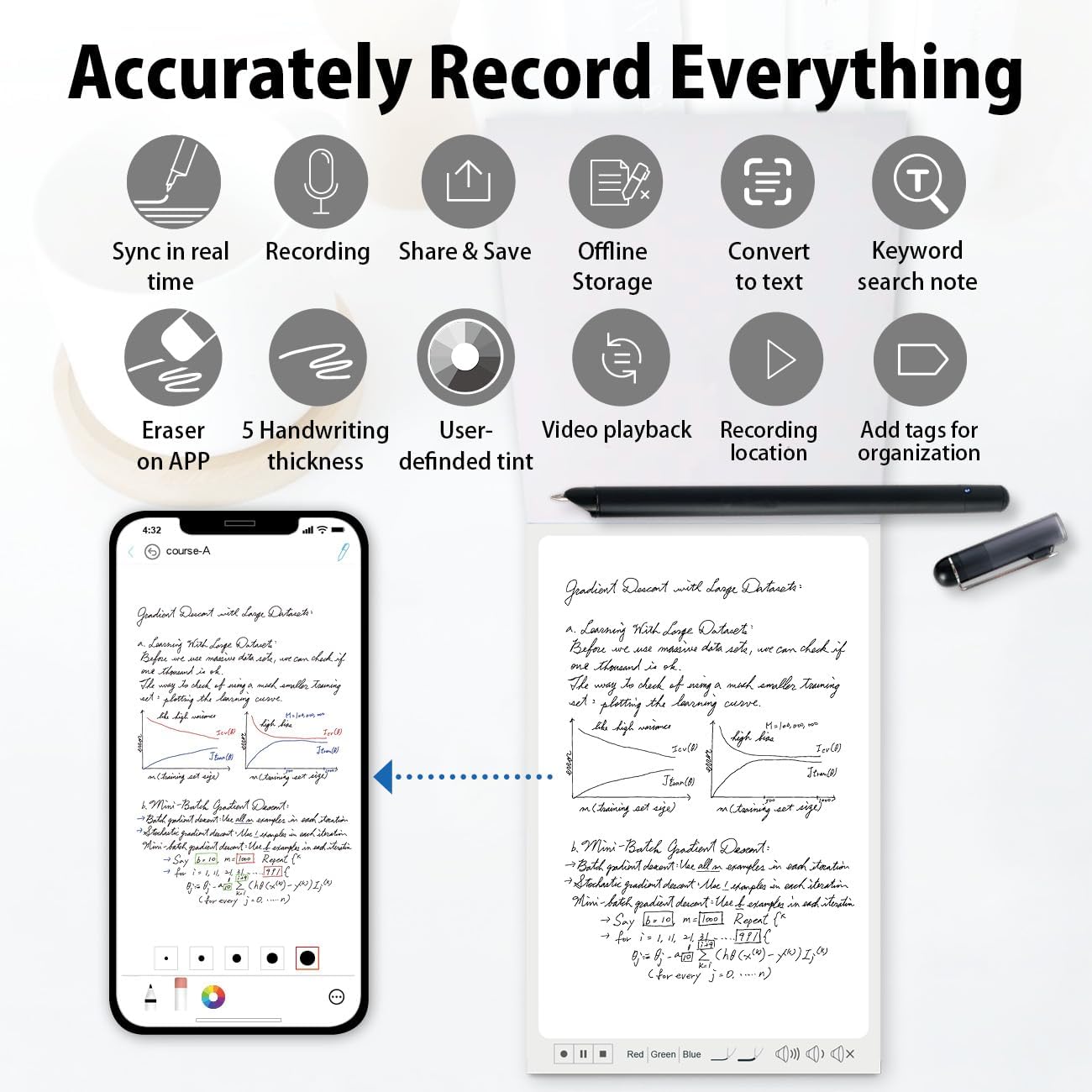
The Smart Pen Set integrates traditional writing with digital, captures handwritten notes on specialized paper or board, instantly syncing them via Bluetooth to the Ophaya pro+ App on smartphones.
Convert ideas into editable digital formats, organize notes, and share across App. Ideal for students and professionals.
Four Smart pen Combo Packages
Replacement-Paper/Pen Refills

Smartpen+Notebook+Board Set
What’s in the box1x smart pen, 1x A5 dot-code notebook(60sheets), 1x writing board, 4x ballpoint refills, 2x plastic Pen Nib, 1x charge cable, 1 x manual

Special Paper Notebook
The smartpen connects to the app to digitally capture your writing on Paper Notebook.

Special Writing board
The smartpen connects to the app to digitally capture your writing on the writing board.

Replacement paper refill
The smart pen+notebook+board set includes a PU notebook with 60 sheets of special paper refill. Once the inner paper is used up, you can purchase replacement refills at our amaozn ophayapen store (Note: Ophayapen smart pens are only compatible with Ophayapen-branded paper)

Replacement pen refill
The set includes 6 pen refills. Once the pen refill is used up, you can purchase replacement refills at our amaozn ophayapen store (Note: Ophayapen smart pens are only compatible with Ophaya-branded pen refill).

Smartpen+WritingBoard Set
What’s in the box1x smart pen, 1x writing board, 2x plastic Pen Nib, 1x charge Cable, 1x manual

Smart Pen + Mini Notebook Set
What’s in the box1x smart pen, 1x Mini Notebook, 2 x ballpoint refills,1x charge Cable, 1 x manual
Is it possible to operate the described functions on the writing board?
No, the writing board is just an alternative to paper writing tool, you should use the smart pen Bluetooth connect to the APP, and the content what you write on the writing board will be synchronized to the APP, and then all the functions need to be operated on the APP.
Is there a fee for the APP?
Hello, no need, APP is free!
Can this smart pen be used with any paper or other product?
Only support any Ophayapen branded products
10 reviews for Smart Pen+Mini notebok, Digital Pen Real-time Sync for Digitizing, Storing, and Sharing Notes, Ideal Smart Pen for Note Taking, Drawing, Classroom, Offices, Compatible with Android and iOS
Add a review

$49.99
Tiffany Kuo –
Good quality
I was on the lookout for a digital solution to minimize paper clutter and stumbled upon the Ophaya Smart Digital Pen . After using it for a few days , I’m compelled to share how much it has transformed my workflow.First off, the setup was a breeze, thanks to the user-friendly manual. The pen itself feels natural in hand, much like a traditional pen, but with the added benefits of digital technology. The dot-code notebook and LCD writing board are phenomenal â my notes sync flawlessly in real-time with the Ophaya APP, and the offline storage feature has been a lifesaver during my travels.The audio recording function has significantly improved my productivity during meetings. I can focus on the discussion without fearing I’ll miss anything because I can revisit the audio later. For someone like me who juggles countless tasks, this feature alone is worth the investment.Sharing notes is a cinch â with just one click, I can convert my notes and doodles into various formats and share them to my team via email. And the compatibility with cloud services like Dropbox and Google Drive means I can access my work anywhere, anytime.To sum up, the Ophaya Smart Digital Pen is a stellar product for anyone looking to digitize their note-taking and creative endeavors without losing the feel of traditional writing. It’s a perfect blend of innovation and practicality. Five stars and highly recommended !
Teacher Ma –
A Tech Marvel for Note-Takers!
I recently purchased this smartpen and I’m genuinely impressed by how it has transformed my note-taking experience. Initially, I was a bit skeptical about whether it could really deliver on its promises, but it has far exceeded my expectations.The most standout feature of this smartpen is its ability to sync seamlessly with digital devices. It’s like magic! Every note I scribble down on paper appears almost instantly on my tablet, making it super convenient to organize and access my notes from anywhere. This feature alone has made it an indispensable tool for my daily use, whether I’m in meetings or just jotting down ideas on the go.Another aspect I love is the battery life. This smartpen lasts for days on a single charge, even with heavy use, which is a huge plus for someone like me who tends to forget to charge their devices. Additionally, the pen feels very natural in hand; it’s neither too heavy nor too light, which makes writing for extended periods a breeze without any discomfort.This smartpen is a fantastic tool for anyone who values the efficiency and convenience of digital note-taking while still appreciating the tactile feel of writing on paper. It’s an excellent investment for students, professionals, and anyone in between who looks to bridge the gap between analog and digital with ease.
Jason T –
Terrible app
So I had previously used a Livescribe Echo and really loved it. I lost the pen and wanted to try something different. I’m really disappointed with this. A couple things to understand, the audio recording is done on your phone, via their Ophaya Pro+ app. So keep in mind that notification sounds etc will be captured in your audio. The user experience in the app for listening back to your recordings is terrible. It’s extremely difficult to move through your notes and through the audio. There’s no way to increase the speed of the audio (sometimes I want to listen at 1.5 or 2x speed to get to the spot I’m looking for) either. And for a recent meeting I was in, I recorded for about 2 hours, multiple pages of notes, and I couldn’t navigate to different sections of my notes at all. I would expect to be able to click on a place in my written notes (in the app) and have the audio play at the point I was taking notes. Not the experience here.The tablet is a nice option for drawing or if you’re just taking a few notes, but the app just falls so short of any expectations for this type of pen. Not to mention I couldn’t find any way to get support for it. So if anyone from Ophaya wants to help, please let me know! I was so disappointed that my return window expired before I was able to really use this and see how terrible it was.
A.Raff –
Helps keep you organized
I bought this type of notetaking device because I wanted my notes in one area. I have used the pad more then the notebook. I find that once you finish a page, you can not go back and add to or make changes. This is a little frustrating as sometimes I need to update my notes. You either start a new page or you end up erasing the old.I do like that the pages are real time on my phone app. this way I can take all my notes with me. I will continue to try to figure out some of the nuances of this Smart-Pen-Notebook.
Jessica –
Smart writing pad with instant sync…. Seamlessly
This digital writing set is a game-changer, killed my stationery addiction. We just scribble on it, tap the app ,and BOOM—the notes magically appear on my phone. No more awkwardly scanning pages or losing scraps of paper! The pen tips are chef’s kiss, providing a traditional pen-on-paper feel with customizable nib attachments for personalized writing comfort. Total mind-blowing detail for a doodle nerd like me.And get this— it comes with a gorgeous leather-bound notebook, which I’ve literally never used. Why? Because syncing is TOO EASY. Meeting, grocery lists,sketch, random midnight ideas—it’s all on my phone instantly. perfect for lazy eco-warriors.you get that paper-feel nostalgia without wasting trees.
Adolfo –
Adquirà este producto e instalé la aplicación desde google play en mi tablet samsung y funciona perfectamente.En mi proyector Samsung Freestyle proyecto y uso como pizarrón lo voy escribiendo, solo duplico pantalla en mi tablet y el proyector lo reproduce como si la aplicación estuviera en el proyector.Increible producto y fácil de usa.
Gomes David –
Parfait
Julz –
Received it today. Instruction manual not greatâ¦download the Ophaya app before you even start unpacking as youâll need it to sync with your phone. I like the notebook and the pen is really nice on the tablet and notebook (use ink refill for notebook). Will update once I learn how to use everything properly
Caro Hubert –
Really love this for work, awesome tool
ååãæ©ãéã£ã¦ãã ããã –
å¨ã®èªçæ¥ã®ãã¬ã¼ã³ãç¨ã§è²·ãã¾ãããã¨ã¦ãåãã§ãã¾ããï¼